
If a submittal gets sent without a transmittal, did it get sent? Technically yes. But if a dispute comes up later, proving it is another story.
A construction transmittal is the cover document that records what was sent, who sent it, who received it, and when. It travels with every drawing package, submittal, shop drawing, RFI, change order, and any other project document that moves between parties. It is not the document itself. It is the record that the document changed hands.
Most project teams understand this in theory. In practice, transmittals get skipped when things get busy. Documents go out by email with no formal record. Submittals get forwarded without logging, especially when teams are still clarifying what a submittal is and how it should move through the review process. By the time a dispute or a closeout review surfaces, the team cannot reconstruct who received what and when.
This article explains what a construction transmittal is, what it needs to include, when to use one, and how to manage them consistently across a project without it becoming a burden on the team.
What a Construction Transmittal Is
A transmittal is a formal document that accompanies any package of project documents moving from one party to another. It functions as a receipt and a record simultaneously. The sender uses it to confirm what was sent. The receiver uses it to confirm what was received. Both parties keep a copy.
Think of it as the chain of custody document for project information. A transmittal answers four questions every time a document changes hands:
- What was sent
- Who sent it and on whose behalf
- Who it was sent to
- When it was sent and by what method
On a well-run project, no drawing package, submittal package, RFI response, or change order moves between parties without a transmittal attached. That practice creates a complete paper trail from the first permit drawing to the final closeout package.
What Transmittals Are Used For in Construction
Transmittals are used across every phase of a construction project and across every document type. Here are the most common scenarios where a transmittal is required.
Submittals and shop drawings
Every time a submittal package moves between parties, a transmittal goes with it. When the subcontractor sends a shop drawing to the GC, that gets a transmittal. When the GC forwards it to the architect for review, that gets a transmittal. When the architect returns it with a review action, that gets a transmittal. Each transmittal captures a different leg of the same journey and together they create the full approval trail for that submittal.
For projects managing dozens of submittals simultaneously, the transmittal log tied to the submittal log is what makes it possible to reconstruct the full history of each item. To see how submittals and the submittal log work together, see our guide on the submittal log in construction.
Drawing packages and revisions
When a new drawing set is issued, when revised sheets are released, or when an architect’s supplemental instruction is distributed, a transmittal goes with it. The transmittal lists every sheet by number, title, and revision level. This is what allows the project team to confirm later that a specific revision was received before a specific date, which matters when a coordination conflict or a change order dispute comes up.
RFI responses
When an architect or engineer returns an RFI response, the response should be transmitted formally and the transmittal logged. This is especially important when the RFI response contains sketches, revised details, or attachments. A logged transmittal confirms that the response reached the GC and was distributed to the field. For more on how RFIs move through the project, see our breakdown of RFI vs submittal management.
Change orders and change directives
Executed change orders and change directives are distributed to all affected parties with a transmittal. The transmittal confirms that the subcontractors performing the changed work received the authorization before proceeding. An undocumented verbal direction with no transmittal record is one of the most common sources of payment disputes on construction projects.
Closeout packages
When the contractor assembles and delivers the closeout package to the owner, a transmittal accompanies it listing every document included. O&M manuals, warranties, as-built drawings, test reports, training records, lien waivers, and the certificate of occupancy are all itemized. That transmittal becomes part of the permanent project record and protects the contractor if the owner later claims a document was never delivered.

What a Construction Transmittal Should Include
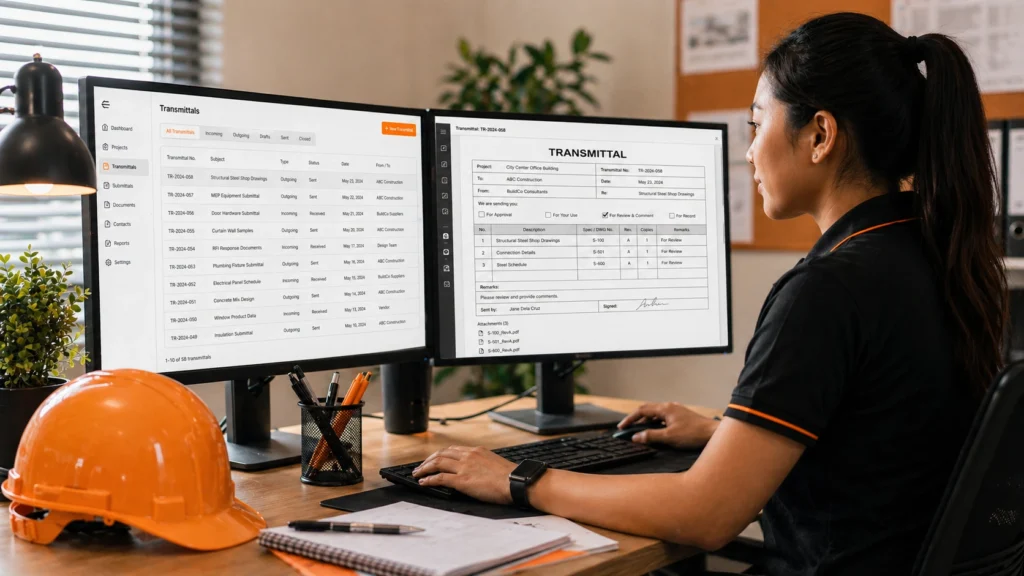
A transmittal does not need to be complicated, but it does need to be complete. Every transmittal should include the following:
| Field | Why It Matters |
| Transmittal number | Unique identifier for the transmittal. Used to cross-reference in the transmittal log and the submittal log. |
| Project name and number | Confirms the document belongs to the correct project, especially when a coordinator is managing multiple jobs. |
| Date sent | Establishes when the document changed hands. Critical for calculating review deadlines and contractual response periods. |
| Sent by | Name, company, and contact information of the party sending the document. |
| Sent to | Name, company, and contact information of the recipient. If copies are sent to additional parties, list them. |
| Transmission method | Email, courier, physical delivery, or through a project management platform. Documents the channel used. |
| List of documents enclosed | Each document listed by name, number, revision level, and number of copies. This is the core of the transmittal. |
| Purpose or action required | For review and approval, for information only, for construction, approved and returned, revise and resubmit, etc. |
| Notes or special instructions | Any context the recipient needs to act on the documents correctly. |
| Signature or acknowledgment field | For physical transmittals, a signature line confirms receipt. For digital transmittals, an email confirmation serves this purpose. |
The list of documents enclosed is the part that gets cut short most often. Teams write “submittal package” instead of listing each document individually. When the receiver later says they never got the shop drawing for a specific scope, the transmittal is useless as evidence because it does not confirm which documents were in the package.
How Transmittals Fit Into the Document Control Workflow
A transmittal is not a standalone document. It is one layer of a broader document control system. When transmittals are prepared and logged consistently, they connect the submittal log, the RFI log, the drawing register, and the change order log into a single traceable record of everything that moved through the project.
Here is how transmittals fit into the workflow at each major handoff point:
- Sub to GC: The subcontractor delivers a shop drawing package. A transmittal lists each drawing by number and revision. The GC logs the transmittal in the submittal log. That entry starts the GC review clock.
- GC to architect or engineer: The GC reviews the shop drawings and forwards them to the design team. A new transmittal is prepared listing the same documents, now with a GC stamp and a note that they are submitted for review. The transmittal date starts the contractual review period.
- Architect to GC: The design team returns the reviewed submittal with a review action stamp. The transmittal accompanying the return documents the return date, the action taken, and any attached comments. The GC logs the return date against the original submittal log entry.
- GC to sub: The GC forwards the reviewed submittal to the subcontractor with another transmittal confirming the review action and any conditions attached to the approval. This is the transmittal that authorizes the sub to proceed.
Each of those four transmittals documents one leg of the submittal journey. Together they prove the complete review cycle happened, when it happened, and what the outcome was. That is the record that matters during closeout and in any post-project dispute.
For a full breakdown of how transmittals fit into the broader document control process, see our step-by-step guide on the construction document control workflow.
What Happens When Transmittals Are Skipped
Skipping transmittals feels like a time saver in the moment. Over the course of a project, it creates the opposite problem.
- Disputed delivery: A subcontractor claims they never received the revised architectural drawings before they built the wrong condition. The GC sent the drawings by email but did not prepare a formal transmittal. There is no transmittal number in the log, no acknowledgment of receipt, and the only record is an email thread that the sub says they did not see. The GC has a harder time defending the position without the transmittal.
- Approval history gaps at closeout: The owner’s representative reviews the closeout package and asks for confirmation that a specific shop drawing was formally approved before the material was ordered. The transmittal log has gaps because transmittals were not consistently prepared. The project engineer has to reconstruct the timeline from emails and memory, which takes days and still may not be complete.
- Review deadline disputes: The architect’s contractual review period runs from the date of transmittal. If there is no transmittal, the start date of that review period is ambiguous. A review that the contractor believes is overdue by two weeks is contested by the architect because the formal submission date was never established.
- Lost documents in a busy review cycle: Without a transmittal log, there is no way to confirm at a glance which submittals have been sent to the design team and which are still sitting with the GC. Items fall through the cracks, review cycles stall, and the project engineer spends time chasing down the status of documents that should already be in the A/E’s queue.
Best Practices for Managing Transmittals on a Construction Project
- Prepare a transmittal for every document that leaves your office. No exceptions for email. If a drawing revision goes out by email, the email should have a transmittal attached or the transmittal should be the body of the email itself, formatted with all required fields.
- Number transmittals sequentially and log them. The transmittal log does not need to be complex. A simple register with the transmittal number, date, sender, recipient, document list, and purpose is enough. What matters is that every transmittal has a number and every number appears in the log.
- List every document individually on the transmittal. Do not group documents under a general description. Each drawing sheet, each shop drawing, each product data sheet gets its own line with its document number and revision level.
- Match the transmittal number to the submittal log entry. When a transmittal accompanies a submittal, cross-reference the transmittal number in the submittal log. This links the two records and makes it possible to pull the full history of a submittal in one place.
- Request acknowledgment of receipt for critical transmittals. For submittal packages with long-lead procurement implications, executed change orders, and closeout packages, confirm that the recipient received the transmittal. A reply email confirming receipt is sufficient. Log the confirmation date.
- Archive transmittals in a shared location, not a personal inbox. Every team member who needs to access the transmittal history should be able to do so without relying on one person’s email. The project management platform, a shared drive folder, or a dedicated transmittal module in Procore all work.
How Virtual Construction Assistants (VCA) Handles Transmittal Management
Transmittals are one of those tasks that everyone knows matters and few teams do consistently. The reason is simple: preparing a transmittal for every document that moves takes time, and on a project where dozens of documents are moving every week, it is easy to skip under pressure.
A construction virtual assistant from Virtual Construction Assistants (VCA) can own transmittal preparation and logging across the full project lifecycle so the team never has to choose between moving quickly and maintaining a clean paper trail.
What a construction VA handles for transmittal management:
- Preparing transmittals for every outgoing submittal, shop drawing package, drawing revision, RFI response, and change order
- Numbering and logging each transmittal in the transmittal register with the date, recipient, document list, and purpose
- Cross-referencing transmittal numbers in the submittal log and RFI log so the full document history is traceable from a single record
- Following up to confirm receipt of critical transmittals and logging the confirmation date
- Archiving all transmittals in the project management platform so every team member has access to the full transmittal history
- Supporting closeout by preparing the final transmittal for the owner’s closeout package and confirming that every document listed in the contract’s closeout requirements is accounted for
Virtual Construction Assistants (VCA) works within the platforms the project team already uses. The construction VA handles transmittal preparation and logging as an ongoing task throughout the project so it never accumulates into a catch-up problem at closeout.
Frequently Asked Questions
What is a transmittal in construction?
A transmittal is a cover document that records what project documents were sent, who sent them, who received them, and when. It accompanies drawing packages, submittal packages, RFI responses, change orders, and closeout documents. Its purpose is to create a verifiable paper trail every time project information changes hands.
Is a transmittal the same as a submittal?
No. A submittal is the document or package being reviewed and approved, such as a shop drawing or product data sheet. A transmittal is the cover document that records the movement of that submittal between parties. Every submittal should have a transmittal attached each time it moves from one party to another.
Do transmittals need to be signed?
On physical transmittals, a signature from the recipient confirms delivery and is worth requesting for critical documents. For transmittals sent digitally, an email reply confirming receipt serves the same purpose. The important thing is that the confirmation of receipt is logged alongside the transmittal record.
What software is used to manage construction transmittals?
Procore has a dedicated transmittal module that links transmittals to submittals and the drawing log. Autodesk Construction Cloud handles transmittals through its document management module. Many teams also use transmittal templates in Excel or Word distributed through email. The platform matters less than the consistency of the process.
How are transmittals numbered on a construction project?
Transmittals are typically numbered sequentially, starting at 001 or T-001. Some teams prefix the number with a project code or year. The key is that the numbering system is consistent from the start of the project and that every transmittal number appears in the transmittal log. Gaps in the numbering sequence are a sign that transmittals were prepared but not logged, or not prepared at all.
Can a construction virtual assistant manage transmittals?
Yes. Transmittal preparation and logging is one of the document control tasks well suited to a construction virtual assistant. The construction VA can prepare transmittals for every outgoing document, maintain the transmittal log, cross-reference transmittals in the submittal and RFI logs, and follow up on receipt confirmations. This keeps the paper trail complete without adding to the project engineer’s workload.
Every Document That Moves Should Leave a Record
Transmittals protect the project team when timelines are disputed, deliveries are questioned, and closeout records need to be verified. If your team is skipping transmittals because there is not enough bandwidth to prepare them consistently, a construction virtual assistant from Virtual Construction Assistants (VCA) can make sure every document that leaves your office has a transmittal behind it.
Contact Virtual Construction Assistants (VCA) to learn how our construction VAs support transmittal management, document control, and submittal coordination for general contractors, subcontractors, and construction management teams.